Create Coupons for Paid Events
Sometimes you need to give people free access to your paid events, because they paid elsewhere, you want to give them a free trial, or some other reasons. To do so, you can create a coupon in Luma.
Create Coupons
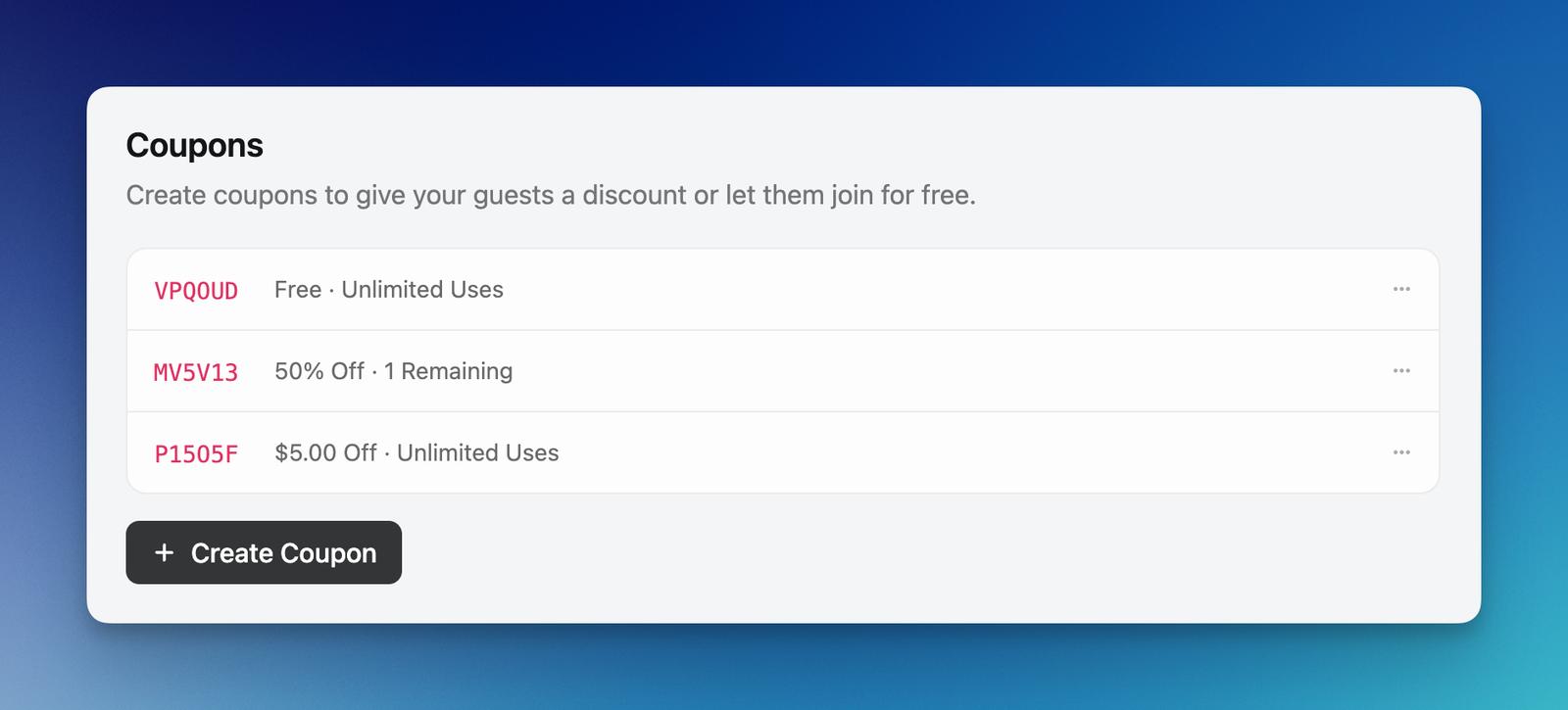
Go to the Registration tab of your Manage Event page, and click on Create Coupon. Give it a name, and specify how many times it can be used for. Save it, and send the coupon to your guest.
Your coupon can be:
- Free
- Percent Discount
- Amount Discount
Also, if your event has multiple ticket types, you can choose which ticket type the coupon should be restricted to.
Note: Once a coupon is created, you cannot change its terms (discount amount, type, or restrictions). If you need different terms, you’ll need to create a new coupon.
Import Coupons via CSV
If your calendar is on Luma Plus, you can bulk create coupons by uploading a CSV. Open the Registration tab of your Manage Event page, click the ⋯ menu next to Create Coupon, and choose Import via CSV.
From the upload step, click Download CSV Template to get a starter file with the right columns:
code— the coupon code guests will enterpercent_off— percentage discount (0–100)cents_off— fixed discount in the smallest currency unit (e.g. cents)currency— three-letter currency code (e.g.USD,EUR), required forcents_offremaining_count— a number, orunlimitedticket_name— restrict to a specific ticket type by name (leave blank to apply to all)valid_start_at,valid_end_at— optional ISO date/time window
Each row must either have a discount (percent_off or cents_off) or be tied to a ticket type — free coupons that apply to every ticket type can’t be imported this way. After uploading, you’ll see a review step listing every parsed coupon before you confirm the import.
Coupons created via import can’t be edited later, just like coupons created one by one, so double-check the file before importing.
Invalidate and Reactivate Coupons
To stop a coupon from being used, click on it and then click Invalidate. This sets its remaining uses to zero so no one can redeem it.
If you invalidated a coupon by mistake, you can reactivate it — just click on the coupon, set the remaining uses back to the number you want, and click Update. Coupons cannot be deleted, only invalidated and reactivated.
Coupon Links
You can send your guests a link that will pre-apply a coupon of your choice. You can do that by clicking on the menu button at the right of the coupon and choosing “Copy Link”.
Redeem Coupons
When your guest goes to the event page, they can click on Use a Coupon to enter the coupon code. Then they will be able to register for your event for free, without needing to enter any payment information.
Calendar Coupons
Every event on Luma is managed by a Luma Calendar. If you’d like to create a coupon that can be applied for any event on the calendar, you can:
- Go to luma.com/home/calendars
- Choose your calendar
- Navigate to Settings → Payment
This coupon will be eligible for any event on your calendar.
If an event has its own coupon with the same code as a calendar coupon, the event-level coupon takes priority. This lets you override a calendar-wide discount for a specific event — for example, offering a higher discount on one event while keeping the standard calendar discount for everything else. If the event-level coupon is exhausted or invalidated, the code will show as invalid for that event — it won’t fall back to the calendar coupon. To use the calendar coupon on that event, use a different code for the calendar coupon.
Limitations
-
Coupon codes must be unique per event. You can’t create two coupons with the same code, even if they’re restricted to different ticket types.
-
A coupon can be restricted to one specific ticket type or apply to all ticket types. There’s no way to apply a single coupon to a subset of ticket types.
-
Coupons can only be applied during the initial registration. If a guest has already registered and returns to purchase additional tickets via group registration, they won’t be able to use a coupon for those additional tickets.
-
Coupons don’t support volume-based discounts (like “buy 2, get 10% off”). As a workaround, you can create a separate ticket type that admits multiple people at a discounted price — for example, a “Couples Ticket” that admits 2 guests for less than the cost of two individual tickets.
-
Remaining Uses caps how many times a code is redeemed, not how many tickets per redemption. With group registration on, one redemption can claim several tickets. To limit tickets per person, turn off group registration (one ticket per redemption) or gate a hidden ticket type with an unlock code, where the ticket capacity is the hard limit.