Featuring Your Event on Luma
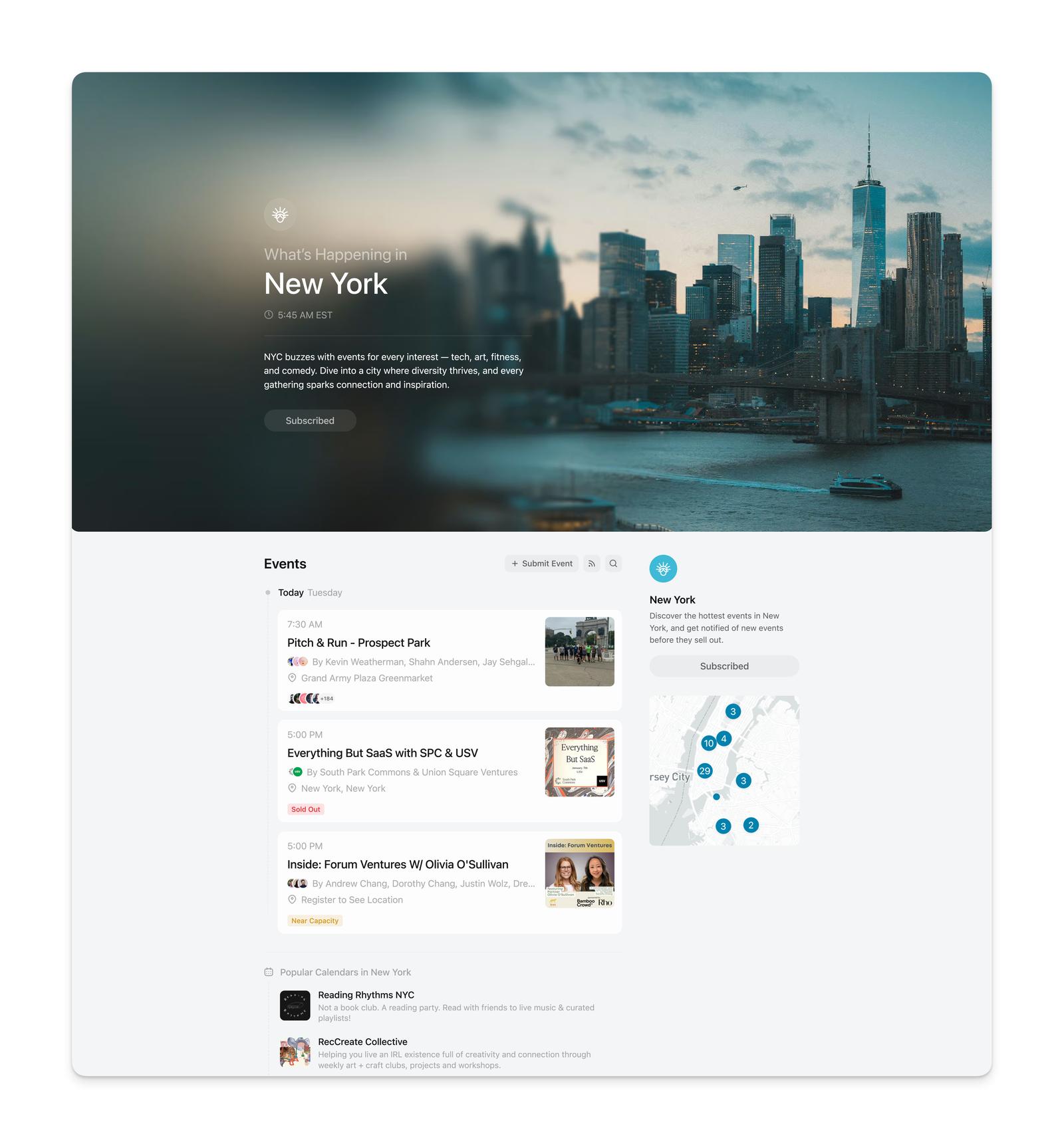
We have explore pages in over 50 cities around the world where we feature high quality, interesting events. These pages inform visitors of what’s happening in their cities, and help drive traffic to the featured events. Getting featured can greatly increase the number of registrations and ticket sales for an event. We’ve talked to hosts who have increased registrations and ticket sales over 5x after getting featured on Luma.
Featured events are picked by our curation team. Our curation system looks at public, in-person events on its own, so you don’t need to submit your event. Submitting from a city page doesn’t make an event more likely to be featured, and there’s no need to submit again after making changes.
If your event is featured on a city page, its hosts get an email and an in-app notification. We don’t share whether an event was considered, or why it was or wasn’t picked.
What Support Can’t Do
Our support team isn’t involved in featuring decisions. Support can’t:
- Guarantee that an event will be featured
- Speed up a decision, or ask the curation team to take another look
- Explain why an event was or wasn’t featured, or share whether a submission was approved
- Add or remove an event from a city or category page
The best way to improve your chances is to follow the guidelines below.
What You Control
- Location — Make your event public and in person, and pick a specific venue from the address suggestions. Online events and events with only a city or area as the location don’t appear on city pages.
- Registration — Keep all registration and ticketing on Luma.
- Event page — Write a clear description, give every host a profile, and use a 1:1 cover image.
- Early traction — Get your own community registered first, and invite people who are likely to come.
Event Selection
We aren’t able to feature every event. Here are some guidelines that the Luma curation team uses when choosing which events to feature:
- The event should be in person and in the region of the explore page. That means for the New York explore page we won’t accept events that are online or far away from New York City.
- The event should have content that appeals to our audience. If the event is too niche or in a foreign language for the city, that will limit the event’s appeal. We often accept events related to tech, wellness, nightlife, and more.
- The event should have enough information so that someone not familiar with the host or the event can understand what the event is about and decide to go. This means the hosts should have profiles and the event should have a clear description.
- The event should look good. Please make sure that your event cover photo is a 1:1 image and looks good on the event page. We do not want to accept events where the cover image is cutoff.
- The event should already have some traction. We do not regularly accept events that have fewer than 5 guests already registered. Market to your own community first. We are happy to boost your reach, but we are not going to do all of your marketing for you.
- We also consider how your invites are performing. Events with higher invite acceptance rates tend to indicate genuine interest from your community, which we take into account when selecting events to feature.
- The event should not link out to another ticketing provider. It’s a bad experience for guests to have to register twice for an event — so we require all events to handle all of their ticketing on Luma.
- Registration should happen entirely on Luma. If guests are told to register or confirm their spot anywhere off-platform — a Google Form, Typeform, another ticketing site — the event isn’t eligible for discovery. That applies anywhere a guest sees it: the description, FAQs, a registration question, or the emails they get after registering. Optional forms for ancillary things like sponsorships, speaker submissions, or exclusive side activities are fine, as long as anyone can join the main event by registering on Luma.
- The event shouldn’t gate its location or details behind an external group. Events that make guests join a private LinkedIn, Discord, WhatsApp, or similar group to find the location or register aren’t eligible for discovery. Set the real venue as the event location so a map shows on the page, and use Restrict Location to Guests if you only want approved guests to see the exact address.
Even if you meet all of the above criteria, your event may not be featured.
Other Ways Your Event Gets Discovered
Being featured on a city page is just one way people find events on Luma. Your public event can also be discovered through:
- Category pages — Events are organized by category (tech, wellness, nightlife, etc.) and your event may appear on relevant category pages even if it’s not featured on a city page. Categories are assigned automatically by our curation system based on your event content — hosts cannot change the category manually.
- Suggested event feed — As users browse Luma, they see personalized event suggestions based on their interests and location. Your event is eligible to appear in these feeds.
- Search engines — Public events are indexed by Google and other search engines, so people searching the web for your event or topic may find it directly. Luma’s own search also surfaces public events — see Searching for Events on Luma.
- Your calendar page — All your public events appear on your Luma calendar, making it easy for people who follow you to discover your upcoming events.
The “Featured in” Badge
Some event pages show a “Featured in [name]” badge near the top, linking to a city explore page or a calendar. That badge only appears when the event is approved on a Luma-curated surface — a city explore page, or one of the calendars our curation team features on Luma.
It isn’t a setting, a permission level, or a plan tier, and there’s no way to turn it on. Getting your event onto a regular calendar — including one you run yourself — lists it on that calendar page, but doesn’t produce the badge.
Ensure Your Event Has a Location
You want to make sure that your event has a location set on the event page.
You can check to see if your event properly has an event location by checking the event page and seeing that it shows a map of the event.
If you paste in an address that we aren’t able to find on Google Maps, we won’t be able to associate that event with a location. So if you type in “Empire State Building” you will want to make sure to choose our suggestion that includes the city and location rather than keeping it as plain text.
The location needs to be a specific venue or address, not just a city or area. An event whose location is only “Berlin” or “Brooklyn” won’t appear on city or category pages. If you don’t want to show the exact address publicly, set the real venue and turn on Restrict Location to Guests — it doesn’t affect featuring.
Weekly Newsletter
We send a weekly newsletter for each city page on Sunday at 6pm. That email will feature around 20 of the upcoming events in that city.
If your event is approved and showing up on the explore page, it will be eligible for our weekly newsletter.
Opting Out of Luma Explore
If your event is included in the Luma Explore but you do not want it to be, you can:
- Update the visibility of your event so that it is not public.
- Remove the event by navigating to the Manage Event page on web and scrolling to the bottom of the Overview tab. You’ll see an option to remove the event.